

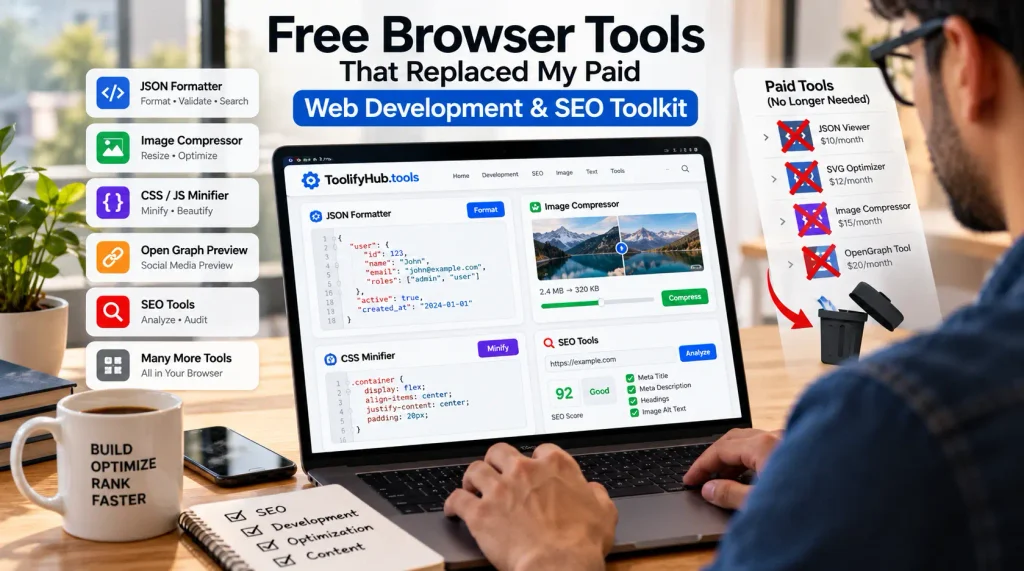
Subscription fatigue gradually affects all agency founders and freelance developers via small, unnecessary costs. In the past, our company’s credit card statement included a dozen minor recurring charges which appeared entirely reasonable individually—such as ten dollars a month for a cloud JSON viewer, twelve dollars for an SVG optimizer, fifteen dollars for image compression API credits, and twenty dollars for an OpenGraph preview service—and together we were spending $220 every thirty days on tools that just manipulated plain text or image buffers.
I put up with the invoices for three years, believing that paying for the tools would ensure quicker execution, better uptime, and professional accuracy. Each time a non-minified CSS file caused the build to stall or a client sent me a messy 4MB JSON dump, I would pay for a web tool.
It was on a Tuesday afternoon, while I was having trouble with a slow staging environment, that the situation became clear. I opened the Chrome DevTools on three paid utilities and looked at the Network tab and what I saw was surprising—the various services sent nothing to the cloud clusters. My laptop was carrying out the work. The services ran simple client-side JavaScript within my tab by using the standard Web APIs, and at the same time they charged my card monthly for a login screen and a dashboard.
For more than eighteen months I took apart that stack. By switching to client-side utilities I was able to cut over two thousand dollars out of our annual software costs without sacrificing precision, speed, or client privacy. Here is an explanation of how modern browser engines have made paid developer tools unnecessary, and what you can do to simplify your toolkit today.
The Architectural Shift: Why Your Browser Tab is Now an Execution Runtime
To understand why paid utilities are becoming obsolete, one has to examine the inner workings of modern browser engines such as Google’s V8 and Mozilla’s SpiderMonkey.
Five years ago, attempting to process a 10MB payload or to compress high-resolution photographs within a tab would result in frozen UI threads and browser crashes. Since the client engines had very tight heap limits, cloud backends were required—this involved uploading the data over HTTP to Lambda or Node.js workers and then waiting for the responses.
That reason is no longer valid. Nowadays browsers are able to run WebAssembly (WASM) at speeds close to those of native binary code, handing heavy CPU tasks over to Web Workers without losing frames, and at the same time HTML5 Canvas and OffscreenCanvas decode, transform and encode pixel buffers directly within local RAM.
When using a modern client-side browser tool, local hardware handles the entire workflow:
- Zero network delay: By avoiding the need to upload large source files over congested networks and then waiting for a position in the server queue, processing starts instantly.
- Raw memory speed: String operations, AST parsing, and image transformations are carried out over your local CPU cores in just a few milliseconds.
- Structural data privacy: Confidential information about customers, copies of proprietary databases, and the credentials used in staging environments remain contained within the browser sandbox without leaking to external hosts.
It makes no sense to pay a monthly fee to format a string or trim the bytes off an image when your laptop’s processor is ten times faster than a shared and throttled cloud container.
Section 1: The Dev Stack: Replacing Paid Code and Data Utilities
Frontend development requires endless data manipulation—things like raw API payloads, large SVG files, and complicated regex expressions. Here is how I substituted paid developer tools with free ones available in the browser.
1.1 JSON Formatting, Validation, and Payload Inspection
People who are integrating third-party APIs spend hours trying to understand minified JSON that extends over thousands of lines; for many years I used a dedicated web-based tool which provided visual trees and syntax checks for a recurring monthly fee.
The situation reached its limit when we carried out an urgent security audit for one of our healthcare e-commerce clients. In order to deal with it, I had to analyse a 6MB catalog export which had accidentally included raw customer order histories. At that moment, the cloud sync feature of the paid tool activated and attempted to store the parsed data on remote servers. If I had pasted the file without noticing, that action would have violated the client’s NDAs and SOC 2 requirements.
We changed our team to use offline-first, client-side formatters. By making use of the native JSON.parse() function, Web Workers, and virtualized DOM rendering, browser-native tools parse, validate, and search 8MB of data in less than a second. They detect syntax errors, isolate trailing commas, and format deeply nested objects immediately without broadcasting a single byte over the public internet.
When handling sensitive staging logs, API responses, or proprietary customer databases, you can perform immediate visual debugging with zero compliance liabilities by relying on dedicated client-side utility platforms like toolifyhub.tools, where code and data inspection tools run entirely in-browser without server telemetry.
1.2 Optimizing SVGs and Minifying CSS and JavaScript
Design teams usually export SVG assets directly from vector software such as Figma or Adobe Illustrator. Although the artwork appears clean when viewed on canvas, the exported markup contains excessive XML namespaces, editor metadata, nested empty grouping tags, and coordinate precision extended to eight decimal places. An icon which should only be 6KB ends up being 45KB when it ships due to hidden vector bloat.
At present, free browser cleaners perform WebAssembly compilations of SVGO directly within your tab. When you drop an SVG into the interface, it immediately removes editor comments, rounds path coordinates, and gets rid of redundant definitions, cutting asset payload by 50% to 70% before it hits your Git repository.
The same level of efficiency holds true when it comes to quickly minifying CSS and JavaScript. It is unnecessary to wait for a continuous integration build or pay for cloud minification services just to compress a 200-line CSS patch or an inline tracking script. In-browser minifiers strip comments, collapse whitespace, and shorten local variables instantly while you inspect and test your patch locally.
1.3 Testing Regular Expressions, Generating Tokens, and Local Cryptography
Writing regular expressions for custom URL routing, input sanitization, or log scraping frequently introduces subtle edge-case bugs. Commercial regular expression debuggers often charge ongoing subscription fees for features such as color-coded capture groups, match counters, and quick cheat sheets.
Browser-based regex tools provide greater practical fidelity because they run on the exact same ECMAScript engine that executes in your users’ production browsers. You test expressions against native JavaScript RegExp implementations, observing match offsets, capture groups, and catastrophic backtracking risks in real time as you type.
Moreover, there is no need to pay for commercial password vaults or token utilities to generate cryptographically secure test tokens, mock API keys, and salted hashes during development. By utilizing the native window.crypto.getRandomValues() Web Cryptography API, in-browser cryptographic generators produce high-entropy strings and hashes right on your local machine, completely avoiding third-party credential leakage.
## Section 2: The SEO and Content Stack: Free Precision Optimization
Technical SEO requires ongoing checks. You have to inspect OpenGraph cards, construct structured JSON-LD schemas, improve Largest Contentful Paint (LCP) assets, and clean up editorial copy. These repetitive tasks used to consume a noticeable portion of our monthly software budget. Migrating to client-side utilities brought immediate workflow efficiency and significant cost savings.
2.1 Lossless Client-Side Image Compression for Core Web Vitals
Excessive image payload remains the primary bottleneck for Largest Contentful Paint (LCP) scores across content-rich websites. Meeting Core Web Vitals thresholds requires assets to be delivered in modern formats such as WebP or AVIF, with standard content graphics kept strictly under 100KB and hero imagery under 250KB.
Digital marketers frequently subscribe to API-based image compression services like TinyPNG Pro or Kraken.io, spending between fifteen and fifty dollars monthly depending on volume. For an agency auditing dozens of client pages weekly, API quota limits disappear quickly.
Modern browser-based compression tools eliminate the need for paid cloud compression tiers. Combining the HTML5 Canvas API with WebAssembly-compiled encoders (such as Google’s libwebp and Mozilla’s MozJPEG), browser tools decode raw bitmaps directly into local memory, resize dimensions, and re-encode them as high-quality WebP images in under 200 milliseconds.
In an internal test auditing 50 production hero images (totaling 180MB), a commercial cloud API required 3 minutes and 42 seconds for network upload, queue processing, and download. In contrast, an in-browser WebAssembly compression tool processed the entire batch across local CPU threads in 24 seconds at zero cost.
2.2 Meta Tag Visualizers, OpenGraph Simulators, and Structured Data Generators
A high-ranking page that fails to generate clicks across search engine results pages (SERPs) or social feeds represents wasted organic potential. Truncated titles, missing OpenGraph fallback images, or incorrect Twitter card tags damage user trust and lower click-through rates.
I previously subscribed to a dedicated SEO suite add-on to preview landing pages across Google Desktop, Google Mobile, Twitter/X summary cards, Facebook link previews, and LinkedIn cards. Despite charging a recurring fee, the service was essentially a static layout preview engine.
Free in-browser meta tag generators resolve this requirement with superior speed and accuracy:
- Pixel-Accurate Snippet Calculation: Search engines evaluate title truncations in pixels (approximately 600px) rather than arbitrary character counts. Client-side tools measure rendered font widths using HTML Canvas text metrics and warn you immediately if high-value keywords get clipped.
- Real-Time Social Card Simulation: Entering OpenGraph tags displays exact social feed rendering instantly, highlighting dimension mismatches and broken fallback image paths prior to deployment.
- Schema.org JSON-LD Generation: Rather than installing resource-heavy WordPress plugins or paying for structured data software, browser-based schema generators let you input structured attributes for Article, FAQPage, SoftwareApplication, and Organization entities, producing syntactically valid JSON-LD markup ready to embed into page templates.
2.3 Forensic Text Sanitizers and Invisible Character Removers
A persistent headache in digital publishing occurs when transferring editorial drafts from collaborative processors like Google Docs, Notion, or Microsoft Word into production Content Management Systems (CMS) or markdown repositories.
Rich-text word processors quietly inject hidden unicode characters into copied text: smart curly quotes and directional apostrophes that break code snippets, non-breaking spaces that distort flexbox line wrapping and cause unwanted horizontal scrolling on mobile viewports, and zero-width spaces that corrupt database queries or SEO scrapers.
Dedicated in-browser text cleaning utilities strip invisible unicode artifacts, normalize curly quotation marks into standard ASCII equivalents, remove redundant trailing whitespace, and normalize line breaks in a single click. Carrying out text normalization locally inside the browser tab takes less than three seconds, saving developers and content teams hours of frustrating layout troubleshooting.
Section 3: Privacy, Data Governance, and Zero Cloud Latency
Beyond immediate cost reductions, the most compelling argument for adopting client-side browser utilities lies in data governance and risk mitigation. In modern web agencies and tech startups, developers routinely handle customer PII, internal API endpoints, and staging authentication credentials during debugging.
When a team member uses a typical commercial cloud tool—whether an online SQL formatter, CSV converter, or base64 decoder—that payload is transmitted over the internet to a third-party server. In many cases, these third-party platforms log request bodies, retain data in temporary caches, or analyze input streams for marketing telemetry. If an employee accidentally pastes proprietary client data or API access keys into an unsecured online tool, the organization is exposed to regulatory penalties under GDPR, CCPA, or HIPAA.
In contrast, zero-latency browser-native utilities execute strictly within the browser’s local sandbox memory. Because no HTTP requests leave your browser tab, your company’s data never touches an external server. The execution environment operates identically to an offline desktop application, giving security officers and compliance leads complete confidence that client information remains private and uncompromised.
Section 4: The 30-Minute Software Stack Audit Framework for Web Teams
If your team is seeking to reduce recurring overhead and improve daily developer workflows, conduct this straightforward four-step audit:
- Inventory Micro-Subscriptions: Review your agency credit card statement for recurring charges under $30 per month. Identify single-purpose SaaS products such as SVG optimizers, JSON visualizers, hash generators, and social preview tools.
- Verify Network Execution: Open Google Chrome DevTools, navigate to the Network tab, and run a sample task through the paid tool. If the Network tab registers no outbound HTTP POST requests containing your payload, the tool is executing client-side on your own hardware.
- Replace with Verified Client-Side Alternatives: Bookmark trusted browser-native utility suites that operate without requiring user logins or cloud storage dependencies. Ensure your engineering team can access these tools offline or via lightweight web interfaces.
- Establish Privacy and Security Standards: Formalize internal guidelines instructing developers and content writers never to paste unvetted customer records or confidential keys into cloud-connected third-party websites, standardizing on client-side sandboxed tools across all development environments.
Conclusion: Embracing Browser-Native Efficiency
The web platform has evolved dramatically over the last decade. Capabilities that once required dedicated cloud servers and expensive micro-SaaS subscriptions are now handled natively inside modern web browsers with remarkable speed, absolute privacy, and zero recurring overhead.
By auditing your software subscriptions and embracing modern, client-side browser tools, your team can eliminate unnecessary monthly expenses, accelerate everyday technical workflows, and ensure complete data security across all client deliverables.

Chris Mcdonald has been the lead news writer at complete connection. His passion for helping people in all aspects of online marketing flows through in the expert industry coverage he provides. Chris is also an author of tech blog Area19delegate. He likes spending his time with family, studying martial arts and plucking fat bass guitar strings.